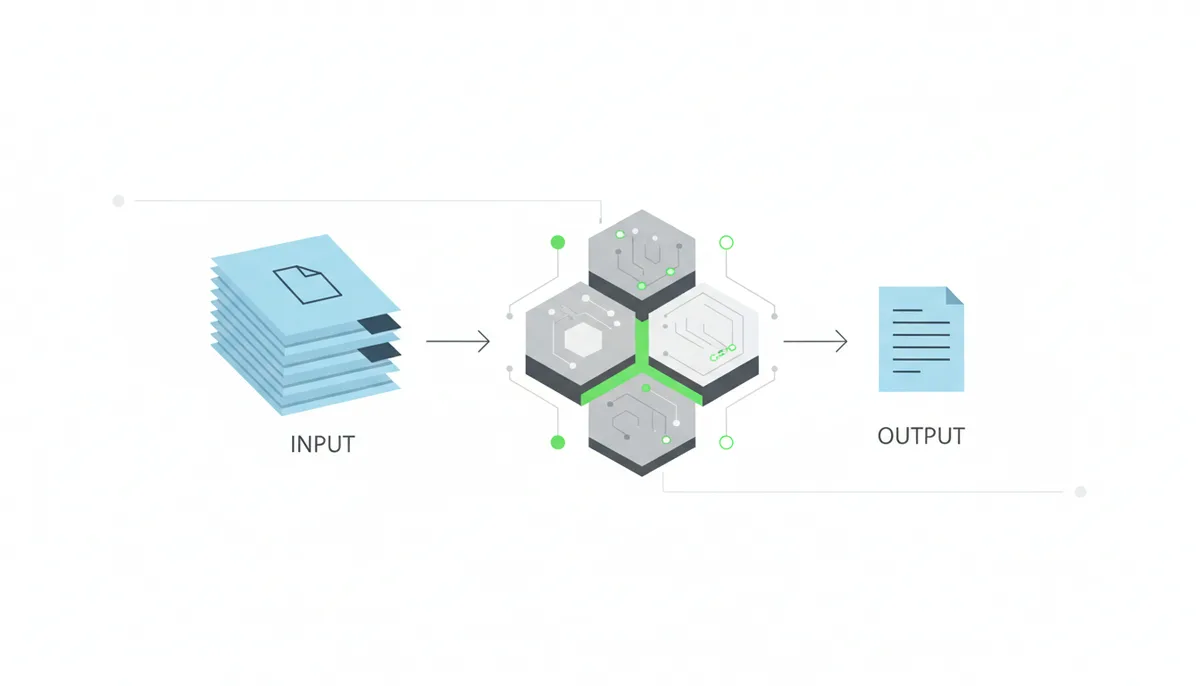
You have a board meeting in two hours. The PDF on your screen is 94 pages of quarterly performance data, regulatory filings, and strategic recommendations. You paste it into an AI summarizer, get back three paragraphs, and send those paragraphs to your CEO. This is where things go wrong—not because AI summarizers are useless, but because you've just made a decision based on content you have not independently verified.
The risk is real. In 2024, a major consulting firm sent a client a summary of a due diligence report that omitted a material liability. The AI had condensed a paragraph about contingent litigation into "the company has some ongoing legal matters." The client signed the deal. The liability was disclosed in full on page 78.
This article gives you a repeatable process to prevent exactly that kind of mistake. It treats AI summary verification as a professional skill—something you learn once and apply every time. Treating summary verification as a risk-management step helps make that idea practical and repeatable.
Why Can't You Blindly Trust an AI Summary?
AI summaries fail in three distinct ways. Understanding each one tells you where to look when you're checking the output.
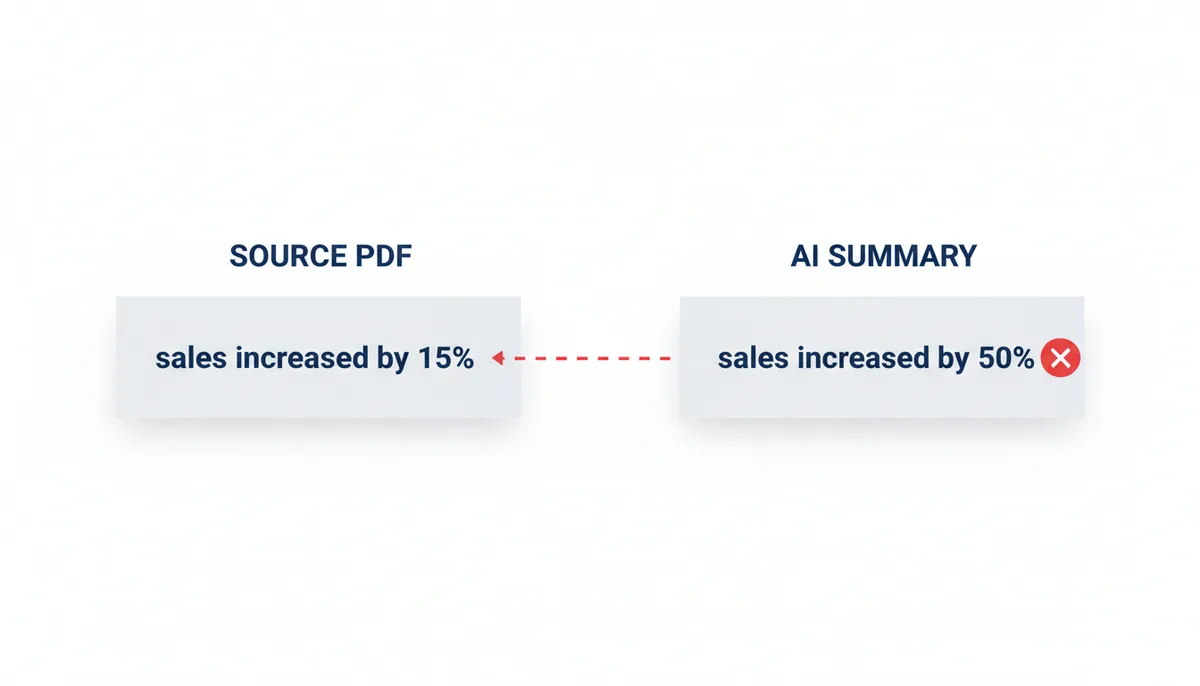
The first category is factual inaccuracies: the AI gets a number wrong, misidentifies a person, or conflates two different sections of the source document. A company name gets swapped. A percentage point gets added. A date shifts by a year. These are the errors that look embarrassing in an email and can undermine your credibility with colleagues.
The second category is missing context: the AI captures facts but drops the qualifiers that make those facts meaningful. The source says "preliminary findings suggest a possible correlation." The summary reads "findings confirm a link." One sentence is cautious science. The other is a conclusion. The difference changes how you act on the information.
The third category is hallucinations: the AI invents details that do not exist in the source. It might generate a quote from a person mentioned in the document, cite a study that was not referenced, or state a causal relationship where the original text only noted correlation. Hallucinations are the most dangerous because they look confident. They use the same confident tone as accurate statements. You cannot distinguish them by feel. Research on AI hallucinations and the need for human oversight underscores why human review remains essential.
Verification is not a sign that the AI tool failed. It is a sign that you are using the tool professionally. The goal is not to avoid AI summaries—it is to use them without letting errors propagate into your work.
How AI Summarizers Read and Condense PDFs
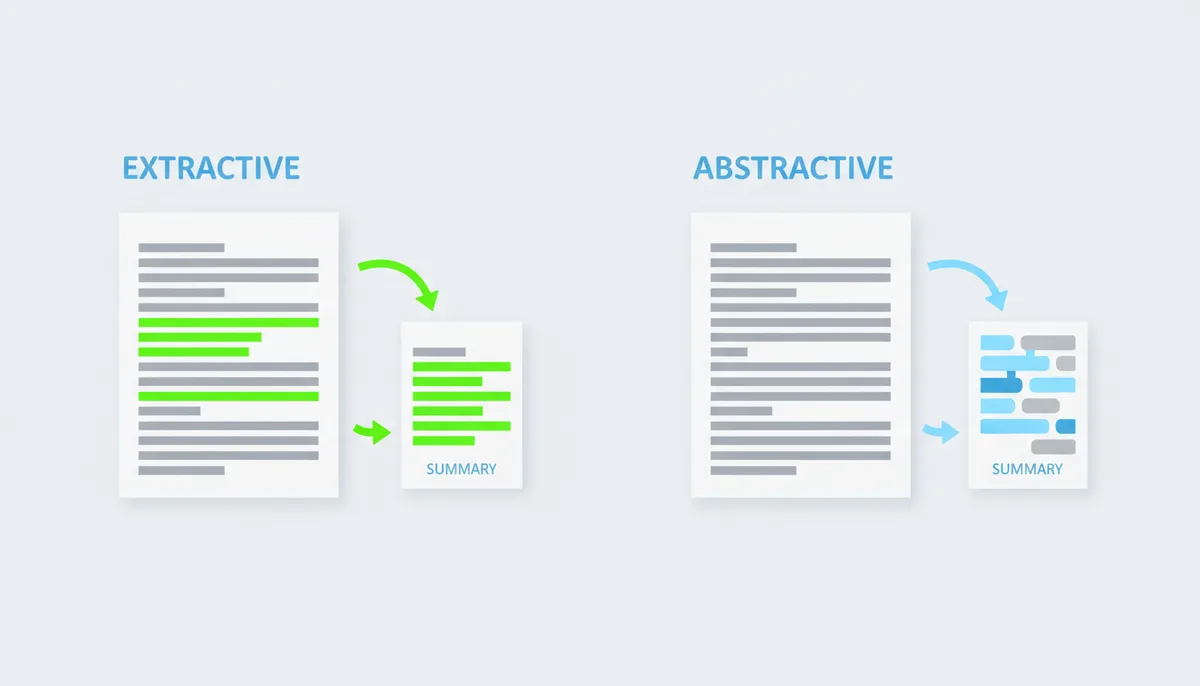
Before you can check a summary, it helps to know how it was made. Most AI summarizers use one of two methods, and each has its own failure modes. The technical literature describes these approaches and the evaluation metrics that accompany them.
Extractive summarization is the simpler approach. The system reads the document, scores every sentence by importance (usually by how often a word appears, or how close it is to other important sentences), and copies the highest-scoring sentences into a shorter output. Think of it like highlighting the key passages and then deleting everything else. The original wording stays intact.
This method tends to preserve factual accuracy—it's literally quoting the source. But it can produce summaries that feel choppy or incomplete, because sentences that score highly on importance might not flow together logically. It also struggles with implied meaning. If the document argues a point across three paragraphs, an extractive summary might grab the opening of each paragraph and miss the connective tissue that makes the argument work.
Abstractive summarization is what most modern tools use, especially those powered by large language models. The system reads the document, understands the content, and writes a new summary in its own words—much like a human would when summarizing something for a colleague. This produces more fluid, readable output that can synthesize ideas across a document.
That fluency comes with risk. Because the model is generating new text, it can introduce errors that were not in the source. It might paraphrase a statistic incorrectly. It might combine two related concepts in a way that changes their meaning. Or it might confidently state something that sounds plausible but is not actually in the document—a hallucination.
There is also a pre-processing problem that many users overlook: the PDF format itself. PDF is a complex, standardized format and scanned or poorly structured PDFs present technical obstacles for extraction tools.
If the document is a scanned image rather than text, the system runs Optical Character Recognition (OCR) to convert the image to text before summarizing. OCR is imperfect. It regularly confuses "0" and "O," misreads columns in tables, and drops words in dense text. Those OCR errors become the input that the AI summarizes. Garbage in, unreliable summary out.
The First Pass: Your 60-Second Sanity Check
Before you do any detailed verification, spend a minute on a quick triage. This step tells you whether the summary is worth the effort of deep checking, or whether you should regenerate it with a different prompt or switch to a different tool.
Start with length. If you fed a 50-page document into the tool and got back a single paragraph, that output cannot possibly capture the substance. A useful summary of a 50-page document is typically 400-800 words, depending on density. If you got 150 words, something went wrong—either the prompt was wrong, the tool misinterpreted the task, or the document structure confused it.
Next, check for proper nouns. Look at the source document's headings, introduction, and any named entities (people, companies, products, locations). Now check the summary. Are the major ones present? If a summary of a quarterly earnings report omits the company name entirely, the tool may have misread the document or concatenated the wrong file. If it omits the CEO's name when executives are prominently discussed, the summary is likely missing whole sections.
Then assess tone. Read two or three sentences from the source. Now read the summary. Does it feel like the same kind of document? An academic paper summary should sound measured and qualified. A legal filing summary should sound precise and formal. If your source is a scientific study and the summary reads like a marketing blog post—"This groundbreaking discovery proves once and for all..."—something has gone wrong in the AI's interpretation.
If any of these checks fail, regenerate the summary before investing time in detailed verification. A bad summary at the 60-second stage will not get better with scrutiny.
The Core Checklist: Verifying Factual Accuracy
Now that you've confirmed the summary is structurally sound, you need to check the content. Work in this order: numbers first, then names, then claims.
Numbers are the easiest to verify because they are precise. Statistics, percentages, financial figures, dates, quantities—pull these out of the summary one by one and find them in the source document. Use Ctrl+F (or Cmd+F on Mac) to search the PDF for the number. If the summary says "revenue increased by 12%," find "12" in the source and read the surrounding context to confirm the figure, the time period, and the category it applies to. Do not assume the AI applied the number correctly. A figure that applies to one product line might be presented as a company-wide figure. A figure for Q3 might be presented as annual.
Names require similar precision. Identify every person, company, product, project codename, and location mentioned in the summary. For each one, search the source document to confirm it appears in the context described. If the summary says "Dr. Sarah Chen led the study," find "Chen" in the document and confirm her role. If it says "the project is based in Munich," find "Munich" and confirm the location.
Direct quotes are especially important. If the summary includes something in quotation marks, verify that exact phrasing exists in the source. AI summarizers sometimes generate phrases that sound like quotes but are paraphrases—or worse, phrases the AI invented that capture the gist but not the substance of what was said. A misquoted executive can create diplomatic problems. A misquoted scientist can misrepresent research findings.
As you verify, use the source document's structure to work efficiently. The table of contents tells you what the document covers and in what order. The section headings tell you what each part is about. Cross-reference the summary's main points against these headings. If the summary spends two of its three paragraphs on a topic that occupies one page in a 90-page document, something is skewed—either the AI over-weighted that section, or the rest of the document was not summarized properly.
Beyond Facts: How to Spot Missing Context and Nuance
A summary can be factually accurate and still be misleading. This happens when the AI drops the qualifiers that make a claim conditional, tentative, or partial.
Read the summary's strongest statements. For each one, find the corresponding passage in the source and compare the language. The source might say "preliminary results suggest a possible link between X and Y." The summary might read "X causes Y." The fact (there is a link between X and Y) is present in both. The context (the link is preliminary, not proven, and only suggested) is present in the source and missing from the summary. You have to catch this by reading carefully, because the AI will not flag its own hedging.
Watch for these specific patterns:
- "Confirms" instead of "suggests." A study that confirms a hypothesis has stronger evidence than one that merely suggests it.
- "Will" instead of "may." A prediction that something will happen carries different weight than one that says it may happen.
- "All" or "every" instead of "some" or "many." The scope of a claim changes dramatically with these words.
- "Demonstrates" instead of "appears to demonstrate." A demonstrated result has survived scrutiny. An apparent result is a preliminary finding.
Beyond individual word choices, look for entire lines of argument that the summary dropped. The source might present a conclusion in one section and then dedicate two more sections to its limitations, alternative explanations, and open questions. If the summary captures the conclusion but not the caveats, you have a summary that is technically accurate and professionally dangerous.
Use this technique: read the summary's conclusions, then check the source for a section near the end called "Limitations," "Discussion," "Caveats," or "Future Work." If the summary's tone is confident and definitive, but the source spends significant space on caveats, the summary has misrepresented the state of knowledge in the document.
| Overconfident AI Phrasing | Likely Source Language |
|---|---|
| "This proves..." | "The data suggests..." or "These findings are consistent with..." |
| "The result is..." | "One possible outcome is..." or "The data indicates..." |
| "Clearly..." | "Appears to..." or "May indicate..." |
| "X causes Y" | "X is associated with Y" or "X may contribute to Y" |
| "Always" / "Never" | "Often" / "Rarely" or "In most cases" / "In some cases" |
| "Experts agree..." | "Some researchers argue..." or "There is ongoing debate about..." |
Hunting for Hallucinations and Overconfident Assertions
A hallucination in an AI summary is a statement that appears confident and plausible but has no basis in the source text. The model did not lie deliberately. It generated text that fit the pattern of the document without verifying that the specific content was actually there.
Hallucinations often share common characteristics that make them identifiable if you know what to look for. They tend to be surprisingly specific. A vague summary is usually a sign that the AI played it safe. A summary that includes a precise quote, a specific study name, a numbered statistic with a decimal point, or a detailed causal chain is much more likely to be hallucinated if it cannot be found in the source.
They also tend to appear at moments of narrative convenience. If the summary needs to explain why something happened and the source is ambiguous, the AI might generate a confident explanation that sounds reasonable but was not in the text. "The company shifted strategy due to market pressure" becomes hallucinated if the source only says the company shifted strategy, with no explanation provided.
Here is how to hunt for them systematically:
Read the summary and flag any sentence that makes you think, "I did not know that" or "I did not expect that." Surprising claims are candidates. Now search the source document for the key terms in that sentence. If you cannot find them, or if you find related terms but not the specific claim, you have likely found a hallucination.
For example: the summary states "A 2022 study by Johnson et al. found that the treatment reduced recovery time by 40%." Search the PDF for "Johnson" and "2022" and "40%." If none of these appear together in the context described, the claim needs to be verified with the original source document or removed.
Another common pattern: the summary attributes a direct quote to someone mentioned in the document. Search for quotation marks in the source near that person's name. If the exact phrasing does not appear, the AI generated a paraphrase that it presented in quote format—a significant misrepresentation.
When you find a hallucination, do not try to rescue it by assuming the AI was "mostly right." Treat it as a signal that the entire summary needs increased scrutiny. If the model invented one detail, it may have invented others.
Is the Summary Balanced? Checking for Bias and Skew
Even if a summary is factually accurate and contextually complete, it can still misrepresent a document by over- or under-representing certain sections. This is bias in the summarization process—not political bias, but structural bias introduced by how the AI weighted different parts of the source.
Compare the summary's focus against the document's structure. Pull up the table of contents or read the major section headings. Now look at what your summary spends its length discussing. If a document has eight chapters and the summary devotes 70% of its word count to Chapter 3, that is a skewed summary regardless of whether Chapter 3 is interesting. It tells a reader that Chapter 3 is what matters, when the document's structure may suggest otherwise.
This skew happens for mechanical reasons. Some sections are denser with named entities and specific data—these tend to score higher in extractive systems and attract more attention from abstractive models. Dense introductions, executive summaries, and methodology sections are common culprits. If the AI has a tendency to gravitate toward certain types of content, it will underrepresent content that is conceptually important but stylistically different.
Here is the concrete process. Open the source PDF and count the approximate word count or page length of each major section using the table of contents as your guide. Most PDFs list page ranges for each chapter in the ToC. Note the relative size of each section—a chapter spanning pages 45-78 is roughly twice as substantial as one on pages 20-30. Now look at your summary. For each major section, count the words or sentences devoted to it. You are looking for proportionality: a section that represents 40% of the source document should not represent 10% of the summary, and vice versa.
When you find over-weighted sections, ask yourself two questions. First, is this section genuinely the most important content for your purpose? If you asked for a summary focused on financial risks and the AI devoted most of its length to the company's history, that is skew introduced by the tool, not a reflection of your intent. Second, does the overrepresentation cause the summary to omit or minimize other sections that are equally important? If the answer to either question is yes, the summary needs correction.
If you find skew, you have two options. First, regenerate the summary with instructions to cover all major sections equally or to weight sections according to your priorities. A prompt like "Summarize each major chapter in approximately equal detail" or "Allocate 60% of the summary to the risk analysis section and 40% to the market overview" gives the AI specific guidance that corrects mechanical skew. Second, if you are working with a tool that does not allow prompt customization, generate separate summaries of each section and combine them manually. This takes longer but gives you full control over the final proportion.
Bias also appears in framing. If a document presents two sides of a debate and the summary only presents one, that is a framing bias. The summary will make it seem like the document argued a position that it actually treated as contested. Read the summary's conclusions. Now check the source for words like "however," "but," "on the other hand," "alternatively," and "critics argue." If these qualifiers exist in the source but not in the summary, the summary has flattened a nuanced argument. When you find this pattern, do not assume the AI intentionally dropped the counterargument. Instead, regenerate the summary with an explicit instruction: "Include the main arguments on both sides of this issue and note any limitations or counterarguments mentioned by the author."
How to Choose the Right Summarizer for Your Task
Not all summarizers are suited for all documents. Using the wrong tool makes verification harder, because the tool's limitations introduce errors that you then have to catch. Matching the tool to the task is the first form of quality control.
Free web tools are convenient for quick overviews of straightforward documents. They work reasonably well on clean, text-based PDFs with a clear structure—modern articles, standard reports, well-formatted documents. Their weaknesses are handling scanned documents, tables with complex formatting, and documents with multiple authors or non-standard structures. They also tend to offer minimal control over output length and style, and many do not support source-linking (clicking a sentence to jump to its location in the original).
Integrated platform tools like PDFator combine summarization with other PDF functions—conversion, merging, splitting—within a single workflow. This is useful if you are working with PDFs that may need pre-processing (converting a scanned document to text, for instance) before summarization. These tools often provide better control over output parameters and may include source-linking features that make verification more efficient. They are the right choice when the document workflow involves multiple steps rather than a single summary request.
Specialized research tools like Scholarcy are built for academic and technical documents. They understand citation formats, recognize academic structures (abstract, methods, results, discussion), and can sometimes link claims to cited sources. These are the right choice for literature reviews, research papers, and technical reports where precision in summarizing methodology and findings matters. Their weakness is usability for general-purpose documents—a marketing brief will confuse their structured output expectations.
Regardless of which category you choose, prioritize tools that offer source-linking: the ability to click or hover on a sentence in the summary and see where it came from in the original document. This feature alone cuts verification time significantly, because it lets you cross-reference without manually searching the PDF. If a tool does not offer source-linking, you are doing more manual work to achieve the same result.
| Tool Type | Typical Method | Key Features | Best For | Potential Weakness |
|---|---|---|---|---|
| Free Web Tools | Abstractive | Quick, no account required, accessible | Clean text PDFs, news articles, simple reports | Limited control, no source-linking, struggles with scanned documents |
| Integrated Platforms (e.g., PDFator) | Abstractive | Multi-step PDF workflow, source-linking, length control | Complex documents needing pre-processing, multi-format workflows | Requires account for full features |
| Specialized Research Tools | Hybrid (Extractive + Abstractive) | Citations tracked, academic structure recognized, source-linked | Research papers, literature reviews, technical reports | Over-engineered for simple documents, higher learning curve |
Advanced Strategy: Guiding the AI with Better Prompts
The most efficient verification happens before you generate the summary, by writing prompts that produce better output in the first place. Better prompts mean fewer errors to catch. This is not about "prompt engineering" as a buzzword—it is about being explicit about what you need.
A vague prompt produces a vague summary. "Summarize this document" invites the AI to decide what matters, which means it applies its own priorities rather than yours. A specific prompt aligns the output with your actual task.
Use this template for high-stakes documents:
- Role: "Act as a [financial analyst / legal reviewer / academic researcher]" — this tells the AI what perspective to take when deciding what is important.
- Audience: "The reader is a [non-technical executive / judge / peer reviewer]" — this controls the assumed knowledge level and language register.
- Goal: "Summarize the key [risks / findings / arguments]" — be specific about what category of content matters most for your decision.
- Format: "Provide a [5-bullet / one-paragraph / two-page] summary" — this controls output length before the AI starts.
- Constraints: "Include key statistics with their context. Note any limitations or counterarguments mentioned in the source." — this is where you tell the AI what you need preserved, rather than hoping it figures it out.
Here is a worked example. Instead of pasting a document and writing "summarize," write:
"Act as a due diligence analyst. Summarize this document for a private equity partner who needs to understand the key risks and material liabilities before a board vote. Focus on financial obligations, pending litigation, and any contractual change-of-control provisions. Note any information the source marks as preliminary, uncertain, or contingent. Provide a structured summary with section headings."
This prompt produces output that is tailored to your use case. The AI knows to look for financial obligations and litigation rather than general themes. It knows to flag preliminary information rather than presenting it as settled fact. You still verify—always—but the summary arrives closer to what you need, which reduces the verification workload.
You can also ask the AI to adopt a critical stance. "Summarize the main arguments, but also explicitly state any limitations or counter-arguments mentioned by the author." This instruction directly addresses the missing-context problem described in Section 5. It forces the summary to include nuance rather than letting the AI's default toward confident, readable output erase the source's uncertainty.
Frequently Asked Questions
Can't I just ask the AI to double-check its own summary?
No. This approach sounds logical but does not work reliably. An AI that has made an error in a summary will often generate a confident confirmation of that error when asked to review it, because the error is now part of its context. The model is not designed to catch its own mistakes on demand—it is designed to generate text that fits the context it has been given. Independent human verification against the source document is the only reliable method. Use the AI to help you locate passages for checking, but do not rely on the AI to tell you whether its own output is accurate.
How long should it take to verify an AI summary?
A good rule of thumb is 10-20% of the time it would have taken you to read the original document thoroughly. If a PDF would require an hour of careful reading, plan on 5-10 minutes of verification. This ratio holds because the verification process is faster than reading—the summary tells you what to look for, and you are confirming rather than discovering. If you find yourself spending more time verifying than you would have spent reading, either the summary is unusually poor (regenerate it) or you are over-verifying for the stakes of the decision.
Does a higher-quality PDF produce a better summary?
Yes, significantly. A text-based PDF with clear structure, proper headings, and standard formatting will yield far better results than a scanned image PDF that requires OCR. OCR errors—confused characters, dropped words, misread table columns—become the input that the AI summarizes. If you are working with a scanned document, pre-process it through an OCR tool before summarizing. The improved input quality translates directly to improved output quality. If the tool you are using does not handle OCR, convert the PDF to a clean text format first.
Is it safe to upload confidential documents to online AI summarizers?
It depends entirely on the service's privacy policy. Free online tools often process documents on shared infrastructure and may retain them for model training or debugging. For sensitive documents—client contracts, internal financials, personnel records, proprietary research—you should use a tool with a clear data privacy agreement that specifies no retention and no training use. Enterprise-grade tools and on-device solutions are the appropriate choice for confidential material. When in doubt, ask whether you would be comfortable with the document's content appearing in an unrelated context. If not, do not upload it.
What's the difference between an AI summary and AI document Q&A?
A summary provides a holistic overview of an entire document—a structured condensation of the whole. Document Q&A answers specific questions you ask about the content. The two serve different purposes: use a summary when you need to understand the full scope of a document before diving in; use Q&A when you have a specific question that a summary would not answer. Both outputs require verification. A Q&A answer can be taken out of context, misquote a passage, or confidently state something that is not supported by the source. The verification principles in this article—checking facts, qualifying certainty language, hunting for bias—apply to Q&A as directly as they apply to summaries.
Can this verification checklist be used for AI-summarized videos or meetings?
Yes, the core principles are universal: check facts against the source, verify that certainty language matches the original, look for omitted nuance and counterarguments, and watch for hallucinated details. The difference is that your source is a video recording or audio transcript rather than a text document. Verification requires comparing the AI output against the transcript and, where possible, the media itself. This is more time-consuming than checking a text document because you cannot Ctrl+F through a video. However, the same disciplined approach—taking nothing at face value, cross-referencing specific claims, checking proportionality—remains the right method.
AI summarization tools are useful. They save time, make large documents accessible, and let you process more information than you could by reading everything. That usefulness depends entirely on whether the summary accurately represents the source. Verification is not an extra step you perform when you do not trust the tool. It is the step that makes the tool trustworthy enough to use.
Sources
- NIST (National Institute of Standards and Technology) — The concept of an AI Risk Management Framework, backing the article's core angle of treating summary verification as a professional risk mitigation process.
- Stanford University Human-Centered AI (HAI) — Claims about the nature and frequency of AI 'hallucinations' and the importance of maintaining human oversight on AI-generated content.
- Association for Computing Machinery (ACM) Digital Library — The technical definitions and distinctions between extractive and abstractive summarization methods and evaluation metrics like ROUGE.
- Google AI Research Publications — Fundamental concepts of how Large Language Models and the Transformer architecture work, which underpins modern abstractive summarizers.
- ISO (International Organization for Standardization) — The claim that PDF (ISO 32000) is a complex format, and that its structure (or lack thereof in scanned documents) presents a technical challenge for data extraction.