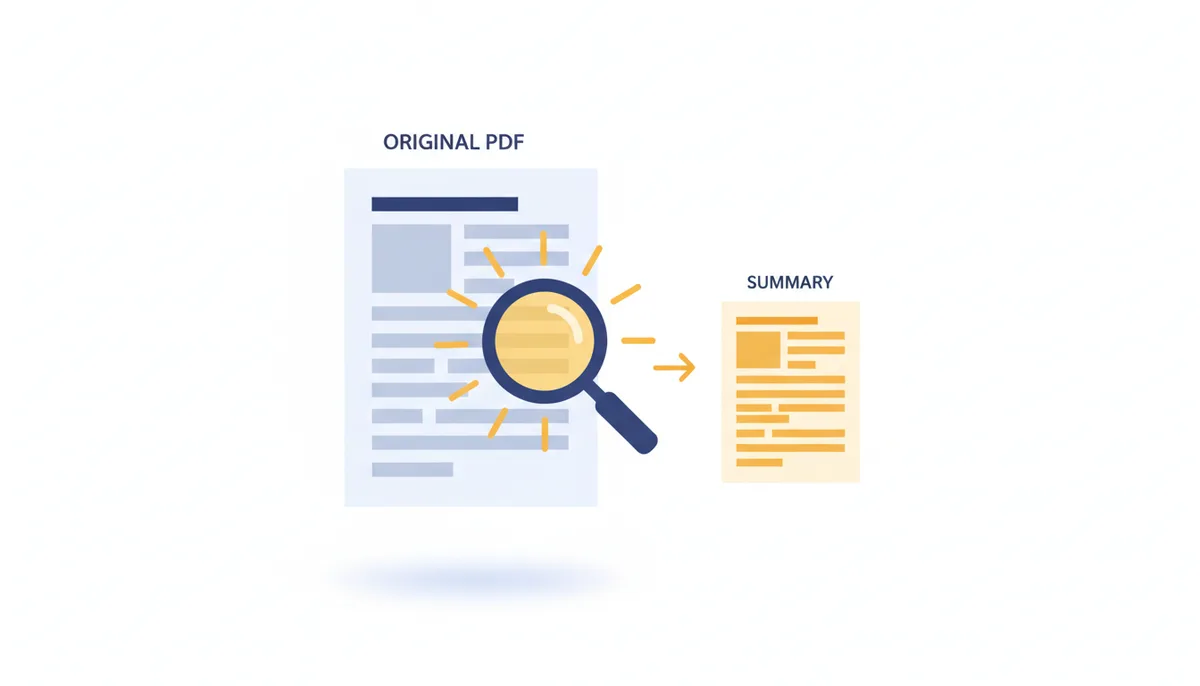
You’ve been handed a 127-page research paper on quantum annealing. Your boss wants the highlights by noon. You don’t have time to read every footnote, let alone decode the methodology section. So you do what most people do: you skim, you highlight, you hope you catch the important bits. But you miss a key limitation in the conclusion. Later, in the meeting, someone calls it out. You’re left scrambling.
This isn’t just about looking unprepared. It’s about the cost of incomplete understanding. Manual summarization is slow, inconsistent, and prone to human error—especially when fatigue sets in. That’s where AI PDF summarization comes in. It won’t replace your judgment, but it can cut your reading time by 80% and surface insights you might otherwise miss. The catch? You need to know how it works, where it fails, and how to use it without being misled.
What problem does AI summarization actually solve?
Imagine you’re a policy analyst. Every morning, you get a folder of reports: climate impact assessments, budget proposals, legal briefs. Each one runs 30 to 200 pages. If you read them all cover to cover, you’d never finish anything else. So you develop shortcuts—skimming abstracts, jumping to conclusions, relying on executive summaries that may be outdated or biased.
That’s the reality for researchers, lawyers, consultants, and students. The volume of text we’re expected to process has exploded. The average peer-reviewed paper is longer now than it was a decade ago. Legal filings are routinely thousands of pages. Even internal company memos have grown more verbose.
AI summarization doesn’t eliminate the need to read. It shifts your role from line-by-line decoder to strategic evaluator. Instead of spending two hours parsing a document, you spend five minutes reviewing an AI-generated summary, then decide whether to dive deeper. You’re not outsourcing comprehension—you’re triaging information.
The real benefit isn’t speed alone. It’s consistency. A human summarizer might emphasize different points depending on their mood, background, or bias. An AI applies the same logic every time. It doesn’t get tired. It doesn’t skip sections because they look boring. It treats a footnote with the same attention as a headline—until you tell it otherwise.
But this only works if the summary is accurate. And accuracy depends on what happens before the AI even starts writing: how it reads your PDF.
How does an AI 'read' a PDF before summarizing it?
Not all PDFs are created equal. To you, they all look like documents. To an AI, they fall into two categories: ones it can read directly, and ones it has to “see” like a person.
A native PDF—also called a vector PDF contains actual text. You can highlight a word, copy it, paste it elsewhere. The text exists as digital characters embedded in the file. When you upload this to an AI tool, the system parses the content directly. It extracts the text in the order it appears in the document’s structure. This is fast and usually accurate.
But a scanned PDF is different. It’s not a document—it’s a photograph of a document. Every page is an image. The words aren’t text; they’re pixels arranged to look like text. To read this, the AI needs Optical Character Recognition (OCR). OCR analyzes the image, detects letter shapes, and guesses what words they represent.
OCR works well on clean, high-resolution scans with standard fonts. But it stumbles on older documents, handwritten notes, or complex layouts. A smudged “o” might become a “c.” A hyphenated word split across lines could be misread as two separate words. These errors get baked into the input, and the AI summarizes garbage in, garbage out.
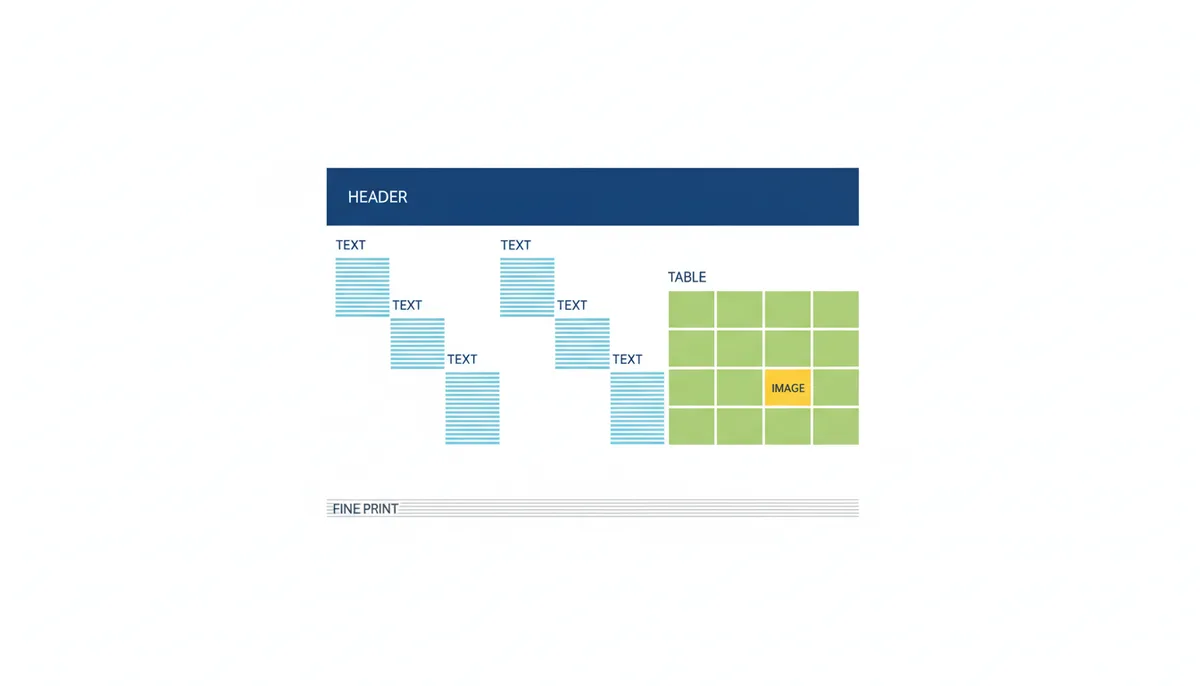
Even with native PDFs, layout is a problem. Consider a scientific paper with two columns, a data table, a figure with a caption, and footnotes. Most PDF parsers read top to bottom, left to right. But in a two-column layout, that means it might read the left column of page 1, then jump to the left column of page 2—skipping the right column entirely unless specifically programmed to handle it.
Tables are worse. A parser might extract table data as a single block of text with no structure. A row like “Q1 Revenue | $2.1M | +12%” could become “Q1 Revenue $2.1M +12%” with no way to tell which number belongs to which metric. The AI sees a string, not a dataset.
Footnotes and captions are often treated as inline text, disrupting the flow. An AI might think a footnote about methodology is part of the main argument, or miss a critical caveat buried in a caption.
This isn’t a minor issue. I once tested a legal brief where the AI summarized a footnote as the main conclusion because the parser had merged it with the preceding paragraph. The summary claimed the defendant had admitted liability—when in fact, the admission was in a hypothetical scenario discussed in a footnote.
The takeaway: if your PDF has complex formatting, the AI might not be reading it the way you are. Always check the extracted text before trusting the summary.
What are the two main ways an AI can create a summary?
Once the text is extracted, the AI has to decide what to include in the summary. There are two fundamental approaches: extractive and abstractive. They work differently, and they come with different trade-offs.
Extractive summarization picks out the most important sentences from the original text and strings them together. It doesn’t write anything new. It’s like using a highlighter to mark key passages, then copying those highlights into a new document. The sentences are unchanged, just reordered.
This method is straightforward. It relies on algorithms that score each sentence based on factors like keyword frequency, position in the document, and similarity to other sentences. One common technique is TextRank, which treats sentences as nodes in a network and ranks them by how connected they are—similar to how Google ranks web pages.
Because extractive summaries use real sentences from the source, they’re usually factually accurate. But they can feel choppy. You might get a sentence from the introduction, then one from the middle of the results section, then one from the conclusion—with no transitions. The logic can be hard to follow.
Abstractive summarization is different. Instead of copying sentences, it writes a new one. It understands the meaning of the text and rephrases it in its own words. This is how humans summarize. It’s also how tools like PDFator’s AI Summarize feature work when set to generate natural-sounding summaries.
Abstractive summaries read more smoothly. They can condense ideas, explain concepts in simpler terms, and create coherent paragraphs. But they carry a risk: hallucination. The AI might invent facts, misstate numbers, or introduce ideas that weren’t in the original text.
The trade-off is clear. Use extractive summarization when you need factual precision—like in legal or financial documents. Use abstractive when you want readability and are willing to verify the output.
| Attribute | Extractive | Abstractive |
|---|---|---|
| Core Process | Selects and combines existing sentences | Generates new sentences based on understanding |
| Factual Accuracy | High — uses original text | Moderate to low — may introduce errors |
| Coherence & Readability | Low to moderate — can be disjointed | High — reads like human writing |
| Computational Cost | Low — simple scoring algorithms | High — requires large language models |
| Risk Factor | Misses context between sentences | Hallucinations, factual drift |
| Best Use Case | Legal contracts, technical specs, audit reports | Research papers, news articles, internal memos |
How do modern LLMs write an 'abstractive' summary?
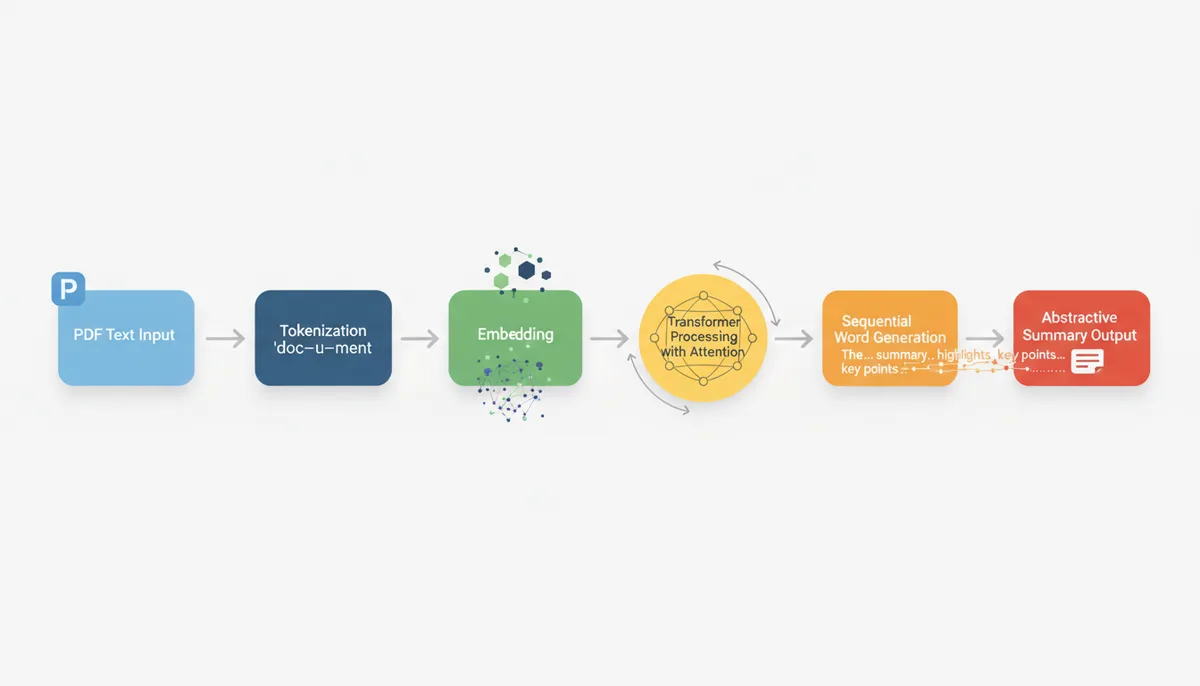
Abstractive summarization relies on Large Language Models (LLMs) trained to generate new text, not just classify or extract. Models like GPT—decoder-based architectures—generate summaries autoregressively, predicting each word in sequence. Sequence-to-sequence models like T5 or BART are also designed for tasks like summarization, translating an input document into a condensed output. BERT, by contrast, is an encoder-only model best suited for tasks like classification, question answering, or extractive summarization, where the output is derived from selecting existing text rather than generating new phrasing.
Here’s how it works, step by step.
First, the extracted text is broken into tokens. A token can be a word, a subword (like “ing” or “pre”), or even a single character. For example, “transformer” might become “trans” and “former.” This tokenization allows the model to handle rare or complex words.
Each token is then converted into a vector embedding—a numerical representation of its meaning in a high-dimensional space. Words with similar meanings have similar vectors. “King” and “queen” are close. “King” and “banana” are far apart. This lets the AI measure semantic similarity.
The heart of the system is the Transformer architecture. Unlike older models that processed text left to right, Transformers look at the entire input at once. They use an attention mechanism to decide which parts of the input are most relevant when generating each word of the output.
Imagine you’re summarizing a sentence: “The company’s revenue increased by 15% due to strong demand in Asia.” When generating the word “increased,” the model pays more attention to “revenue” and “15%” than to “Asia.” When writing “Asia,” it focuses on “demand” and “strong.” This dynamic weighting allows it to capture relationships across long distances in the text.
The model generates the summary one token at a time. It starts with a prompt like “Summarize this document:” and then predicts the most likely next word based on the input and the words it has already written. It repeats this process until it reaches a stopping point—either a natural conclusion or a length limit.
This is why abstractive summaries can sound so human. They’re not stitched together from templates. They’re synthesized from patterns the model learned during training. But that same process is why they can go wrong. If the model was trained mostly on news articles, it might summarize a scientific paper with too much simplification. If it hasn’t seen enough financial reports, it might misrepresent a balance sheet.
How can you get the most accurate and useful AI summary?
You don’t have to accept whatever summary the AI gives you. You can guide it. The key is prompt engineering—crafting your request to get the output you need.
Start with the basics. Don’t just say “summarize this.” That’s too vague. The AI has to guess your intent. Instead, be specific.
If you’re reading a research paper, try: “Summarize the methodology and key findings of this paper in three bullet points for a technical audience.” This tells the AI what to focus on, how long to make it, and who it’s for.
If you’re reviewing a business proposal, use: “Extract the financial projections, risks, and recommended actions in a one-paragraph summary for a CEO.” Now the AI knows to prioritize numbers, highlight uncertainties, and frame the output for a decision-maker.
You can also control the tone. “Summarize this legal contract in plain English for a non-lawyer” will produce simpler language than “Summarize using legal terminology.”
Another trick: ask for structured output. “List the five main arguments in order of importance, with a one-sentence explanation for each.” This forces the AI to organize its thinking and gives you a clearer framework for evaluation.
But even with a good prompt, the first result might not be perfect. That’s where iteration comes in. If the summary misses a key point, revise your prompt: “Include the limitations mentioned in the conclusion.” If it’s too technical, add: “Use simpler terms and avoid jargon.”
I once worked with a team analyzing clinical trial reports. They started with generic prompts and got summaries that emphasized secondary outcomes over primary ones. Once they changed the prompt to “Focus on primary efficacy and safety endpoints,” the quality improved dramatically.
Also, prepare your document. If it’s a scanned PDF, run it through a high-quality OCR tool first. If it’s a native PDF with messy formatting, consider converting it to plain text and cleaning it up—removing headers, footers, and page numbers that aren’t part of the core content.
And always, always verify critical details. If the AI says “the study showed a 40% improvement,” go back and find that number in the original. Don’t assume it’s correct.
What are the common errors and limitations of AI summaries?
AI summaries fail in predictable ways. Knowing these helps you spot problems before they cause real-world damage.
Hallucination is the biggest risk. This happens when the AI invents facts. For example, summarizing a paper on renewable energy and claiming “the study found solar power is 60% cheaper than coal” when the original said “in some regions, solar can be up to 40% cheaper under optimal conditions.” The AI took a conditional, qualified statement and turned it into a broad, confident claim.
Another common error is omission. The AI might skip a crucial limitation, assumption, or counterargument. In one test, I fed a climate report into three different tools. Two of them summarized the projected temperature rise but left out the confidence interval. The third omitted the section on mitigation strategies entirely.
Numbers are especially vulnerable. A misplaced decimal, a swapped figure, or a misattributed statistic can change the meaning completely. I’ve seen AI summaries turn “2.5% growth” into “25% growth” and “Q3 losses of $1.2M” into “Q3 profits of $1.2M.” These aren’t typos—they’re model errors in parsing or generation.
Names and technical terms get mangled too. “Dr. Elena Rodriguez” becomes “Dr. Helen Rodriguez.” “Photosynthesis” becomes “Photocynthesis.” These small errors can undermine credibility, especially in academic or legal contexts.
Then there’s nuance. AI struggles with sarcasm, irony, and subtle arguments. A paper that critiques a policy using understated language might be summarized as supporting it. A study that says “the results are inconclusive” could be rendered as “no significant effect was found,” which sounds more definitive than the original.
And don’t expect AI to interpret visuals. If your PDF contains a chart showing a sharp decline in sales, the AI might summarize the caption—“Sales by quarter”—but miss the trend. It can’t “see” the data. It only sees the text around it. Even if the chart has labeled axes, the AI may not connect the labels to the visual pattern.
Tables are slightly better, but only if the text extraction preserved the structure. A well-formatted table might be read correctly. A complex one with merged cells or nested data will likely confuse the parser, leading to garbled input and unreliable output.
The bottom line: AI summaries are drafts, not final products. They’re starting points for your own analysis, not replacements for it.
How do you choose the right AI summarization tool?
Not all tools are built the same. Some are better for speed, others for accuracy or security. Your choice depends on what you’re summarizing and why.
Start with security. If you’re handling sensitive documents—legal contracts, medical records, internal strategy—you need a tool that processes your data securely. Some web tools upload your file to their servers, where it might be stored temporarily or even used for training. Others offer end-to-end encryption or local processing. Always check the privacy policy. If it doesn’t clearly state when and how your data is deleted, assume it’s kept.
Next, consider document support. Can the tool handle scanned PDFs? Does it preserve formatting during text extraction? If you work with older or image-heavy documents, this matters. PDFator, for example, supports OCR for scanned files, which expands its usefulness beyond clean, text-based PDFs.
Summarization quality varies widely. Free tools often use older or smaller models, which may produce generic or inaccurate summaries. Paid tools typically offer access to larger, more capable LLMs. They may also let you choose between extractive and abstractive modes, or adjust the summary length and focus.
Cost is a factor, but not the only one. Many tools offer a free tier with limited features—say, 10 pages per summary or 5 summaries per month. That’s fine for occasional use. But if you’re summarizing dozens of documents a week, you’ll need a Pro plan. PDFator’s pricing page lists these limits clearly, which helps you decide without surprises.
Finally, test before you commit. Pick a representative document—one with complex layout, tables, or technical content—and run it through several tools. Compare the outputs. Does one capture the key points better? Does another make factual errors? Is one faster or easier to use?
Don’t just test once. Try different prompts. See how well each tool responds to refinement. A good AI summarizer should improve with better instructions.
| Tool Type | Pros | Cons | Best For |
|---|---|---|---|
| Online Web Tool | No installation, accessible from any device, often free for basic use | Data leaves your device, limited customization, dependent on internet | Quick, one-off summaries of non-sensitive documents |
| Integrated Desktop Software | Higher security, better PDF handling, offline use | Expensive, requires installation, may have steeper learning curve | Professionals who work with PDFs daily (lawyers, researchers) |
| Browser Extension | Convenient for web articles, works in context | Limited to text on screen, often basic summarization | Students or casual users reading online content |
| API Service | Customizable, scalable, can be integrated into workflows | Requires technical skills, ongoing cost, self-managed security | Developers building document processing pipelines |
What's the next frontier for AI document analysis?
Summarization is just the beginning. The next wave of AI tools lets you interact with documents conversationally.
Imagine uploading a 200-page annual report and asking, “What were the main factors behind the 12% drop in European sales?” The AI scans the document, finds the relevant section, and gives you a direct answer—no need to summarize the whole thing first.
This “chat with your PDF” functionality is already available in some tools, including AI-powered features on platforms like PDFator. It uses the same underlying LLMs but applies them to question-answering instead of one-shot summarization. You can ask follow-up questions, drill into details, and cross-reference sections—all in natural language.
Beyond chat, multi-modal AI is emerging. These models can process text, images, and tables together. Instead of just reading the caption of a chart, they can analyze the visual data—recognizing trends, comparing bars, interpreting curves—and include that in the summary.
For example, a multi-modal AI might look at a line graph showing quarterly revenue and say, “Revenue peaked in Q3 but dropped sharply in Q4, a trend not explained in the text.” That’s a level of insight current text-only models can’t reach.
Further out, we’re starting to see AI systems that can fact-check claims within a document by cross-referencing external databases. If a report claims “global temperatures rose 1.5°C since 1900,” the AI could verify that against climate datasets and flag discrepancies.
These capabilities are still developing. They require more compute, better training data, and tighter integration between vision and language models. But they point to a future where AI doesn’t just summarize documents—it helps you interrogate them.
When AI summarization fails: real-world examples and how to recover
A startup founder once sent me a summary generated from a term sheet. The AI claimed the investor had agreed to a 20% ownership cap on convertible notes. The actual document said 25%. That 5% difference could cost millions in dilution. The error wasn’t a typo—it was a misread clause buried in a complex sentence with multiple conditions. The AI extracted the number but missed the qualifying phrase that changed its meaning.
This isn’t rare. I’ve seen AI misrepresent expiration dates in NDAs, reverse the direction of financial trends in earnings reports, and invent quotes in academic papers. These aren’t edge cases—they’re common failure modes in high-stakes documents.
One major cause is sentence fragmentation. PDF parsers often break lines at page boundaries or column edges. A sentence like “The agreement shall terminate on the earlier of (a) December 31, 2025, or (b) the completion of the acquisition” might get split into two lines. The parser reads it as two separate statements: “The agreement shall terminate on the earlier of (a) December 31, 2025,” and “or (b) the completion of the acquisition.” The AI then treats “or (b)” as a new thought, ignores it, or misattributes it. The summary omits one termination condition entirely.
Another issue is acronym expansion. If a document introduces “FDA” on page 3 and uses it throughout, an AI might not connect it back to “Food and Drug Administration” when summarizing. Later, if a new acronym like “FBI” appears, the model might conflate the two agencies in its semantic space, especially if the context is vague. I’ve seen summaries refer to “regulatory approval from the FBI” because the model associated “federal agency” + “review process” and guessed wrong.
Legal definitions are another trap. Many contracts include sections like “For purposes of this Agreement, ‘Revenue’ means gross income before deductions.” If the parser skips this definition or the AI doesn’t weight it heavily, it might summarize financial terms using a general understanding of “revenue,” not the contract’s specific definition. The result? A summary that looks right but is legally inaccurate.
So what do you do when the summary feels off? First, don’t discard it. Use it as a diagnostic tool. Compare the AI’s version to your own understanding. If something seems oversimplified or contradictory, trace it back. Most tools don’t show their source sentences, but you can test by searching the original PDF for key claims in the summary.
If the AI says “the study recommends immediate action,” search for “recommend” and “immediate.” You might find the actual text says “further research is needed before policy changes are considered.” The AI compressed “no recommendation” into “recommend action” because both contain strong verbs.
Another recovery tactic: reprocess with extractive summarization. Switch from abstractive to extractive mode if your tool allows it. Extractive summaries won’t fix parsing errors, but they’ll show you exactly which sentences the AI considers important. If those sentences are out of context or fragmented, you’ve found the root problem.
Finally, break the document into smaller chunks. Instead of summarizing a 50-page report in one go, split it by section. Summarize the methodology, then results, then conclusion. This reduces the chance of cross-contamination and gives you finer control. You’ll spot inconsistencies faster and can manually connect the dots where the AI failed.
Cost, effort, and workflow: how to integrate AI summarization without slowing down
AI summarization saves time only if your workflow supports it. I’ve watched teams adopt tools, generate summaries, then spend more time verifying them than they would have reading the original. The problem wasn’t the AI—it was the process.
Here’s what works: treat AI summaries as first drafts, not final outputs. Build a three-step workflow—summarize, scan, verify—and assign each step a time limit.
Step one: summarize. Upload the document, apply your best prompt, and generate the output. This should take under two minutes. If your tool requires login, file conversion, or multiple clicks, switch to one that doesn’t. A streamlined interface with drag-and-drop support reduces friction significantly.
Step two: scan. Read the summary in 60 seconds or less. Ask: does this capture the main purpose? Are any claims surprising or vague? Flag anything that feels off. Don’t fact-check yet—just triage.
Step three: verify. Pick two or three key claims and locate them in the original. Check the context. If the summary says “sales increased 30%,” find that number. Is it year-over-year? Quarter-over-quarter? Does the text include a disclaimer like “excluding inflation”? This step should take no more than five minutes for a 20-page document.
This entire process takes under eight minutes. A full read would take significantly longer—often 30 minutes or more for a dense report. You’ve saved time and reduced risk.
But effort isn’t just about time. It’s about cognitive load. If you’re switching between five tools, logging in and out, or wrestling with file formats, you’re adding friction that kills efficiency. The best setup keeps everything in one place. Use a tool that handles PDFs directly, supports OCR, and lets you edit prompts without re-uploading.
Cost is another factor. Free tools seem attractive, but they often limit usage. One free service allows three summaries per day. If you hit the limit, you’re forced to wait or upgrade. That disruption breaks flow. Paid plans typically offer higher limits and consistent access. For heavy users, even a modest subscription can save hours a week.
Don’t overlook file management. If you’re summarizing dozens of documents, create a simple system: a folder for originals, a text file for summaries, and a spreadsheet to track verification status. Label files clearly—“2024_Q3_Report_Summary_Verified” tells you everything at a glance.
Frequently Asked Questions
Does the AI store my document after it creates the summary?
This depends on the service's privacy policy. Reputable tools process your document and then delete it from their servers after a short period. Always check the privacy policy for tools you use with sensitive information.
Can AI summarize a password-protected PDF?
No. The AI tool needs to be able to read the document's content. You must first remove the password protection before uploading the PDF for summarization.
Is an AI-generated summary good enough to cite in academic work?
No. You should never cite the AI's summary. Use the summary to quickly understand if the original paper is relevant, then read the original source and cite it directly.
How long of a document can an AI summarize?
This varies by tool. Free tools often have page or file size limits, while paid plans typically offer much larger 'context windows' that can handle hundreds of pages. Check the specific tool's pricing or feature page for its limits.
Can an AI accurately summarize the data in tables and charts?
Generally, no. Most current AI summarizers are text-focused and struggle to interpret visual data like charts or complex tables. They may summarize the caption or surrounding text but will likely miss the nuances within the graphic itself.
Can AI summarize documents in languages other than English?
Yes, many modern LLM-based summarizers are multilingual and can handle a wide variety of languages. However, the quality of the summary may be highest for English and other widely spoken languages.
Sources
- arXiv.org (Cornell University) — The technical foundation of the Transformer model (see the paper "Attention Is All You Need" which introduced this architecture).
- Stanford Natural Language Processing Group — Foundational academic definitions and explanations of NLP, tokenization, and the distinction between extractive and abstractive summarization.
- OpenAI — Information on the capabilities and architecture of GPT-series models and other LLM research used for abstractive summarization.
- Adobe — The distinction between native (vector) and scanned (raster/image) PDFs, which is a critical factor in how an AI can extract text.
- Association for Computational Linguistics (ACL) Anthology — Primary research on summarization evaluation metrics, including the original papers that define ROUGE and related evaluation methods.