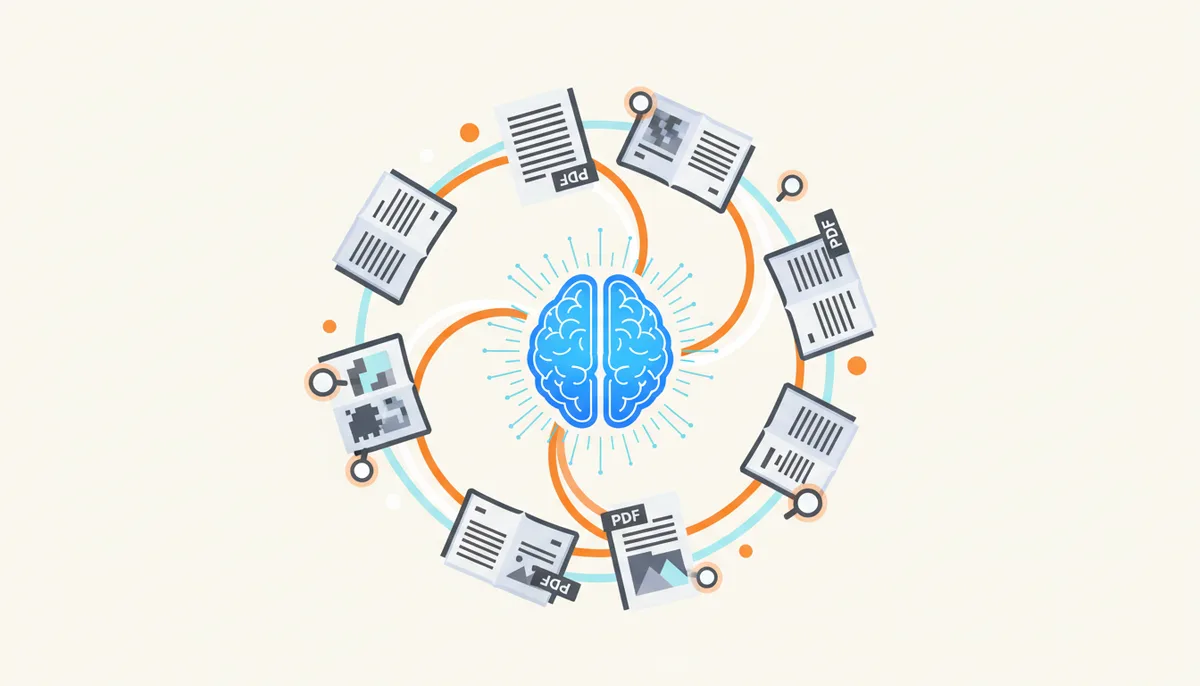
Your browser has seven tabs open. One of them holds a forty-page regulatory compliance update you need to read before your morning meeting. Another is a technical specification sheet for a vendor proposal due at five PM. You don't have time to read every word of either document. Most professionals in your position reach for the same shortcut today: they upload the PDF to an AI summarizer, copy the result, and assume they are caught up.
This approach creates a false sense of security. An AI summarizer can save you hours of reading trivial content. It can also hand you a simplified, inaccurate version of a critical document and let you make decisions based on missing context. The difference between those two outcomes depends entirely on what kind of document you are feeding the machine and what you intend to do with the summary.
If you treat an AI summarizer as a magic decoder ring that guarantees understanding, you will eventually encounter hallucinations, omitted clauses, or flattened nuance that cost you time, money, or credibility. If you treat it as a sophisticated triage tool—a way to scan a massive document to decide whether a full manual read is actually necessary—you gain efficiency without losing control.
This guide maps out the exact boundaries of AI PDF summarization. We will look at how these systems actually process text, where they excel at rapid information extraction, and where their structural limitations create dangerous blind spots. You will get a decision framework for evaluating document types, specific prompt strategies to force greater accuracy, and a breakdown of the technical features that separate a trustworthy tool from a data leak waiting to happen.
Is an AI Summarizer the Right Tool for Your PDF?
The core problem driving the adoption of AI summarizers is simple: information volume has exceeded human processing speed. Professionals routinely inherit stacks of PDFs—academic literature, legal filings, financial reports, internal memos—that were never designed to be scanned quickly. The file formats lock information into static pages, making search difficult and reading linear.
An AI summarizer promises to solve this by compressing fifty pages of text into three bullet points. The mechanism relies on Large Language Models (LLMs) to recognize patterns in natural language and synthesize key themes. The promise is speed. The conflict is loss. Compression inherently removes detail. When you ask an AI to summarize a document, you are trading granularity for velocity.
You need to decide if that trade-off is acceptable for the task at hand. We can categorize documents into broad classes:
- Academic and research papers: Dense with methodology, citations, and nuanced argumentation.
- Legal contracts and agreements: Highly structured, dependent on precise definitions, conditional clauses, and cross-references.
- Technical manuals and specifications: Step-by-step procedures, warning labels, and exact numerical parameters.
- Financial reports and 10-Ks: Narrative analysis backed by intricate tables, footnotes, and regulatory disclosures.
- Internal business communications: Memos, meeting transcripts, and project briefings.
For some of these categories, AI summarization is a standard part of the workflow. For others, relying on an automated summary instead of reading the original document is a professional liability. The goal here is to provide a clear model so you can match your specific document to the right level of human verification.
How Do AI Summarizers Actually 'Read' a Document?
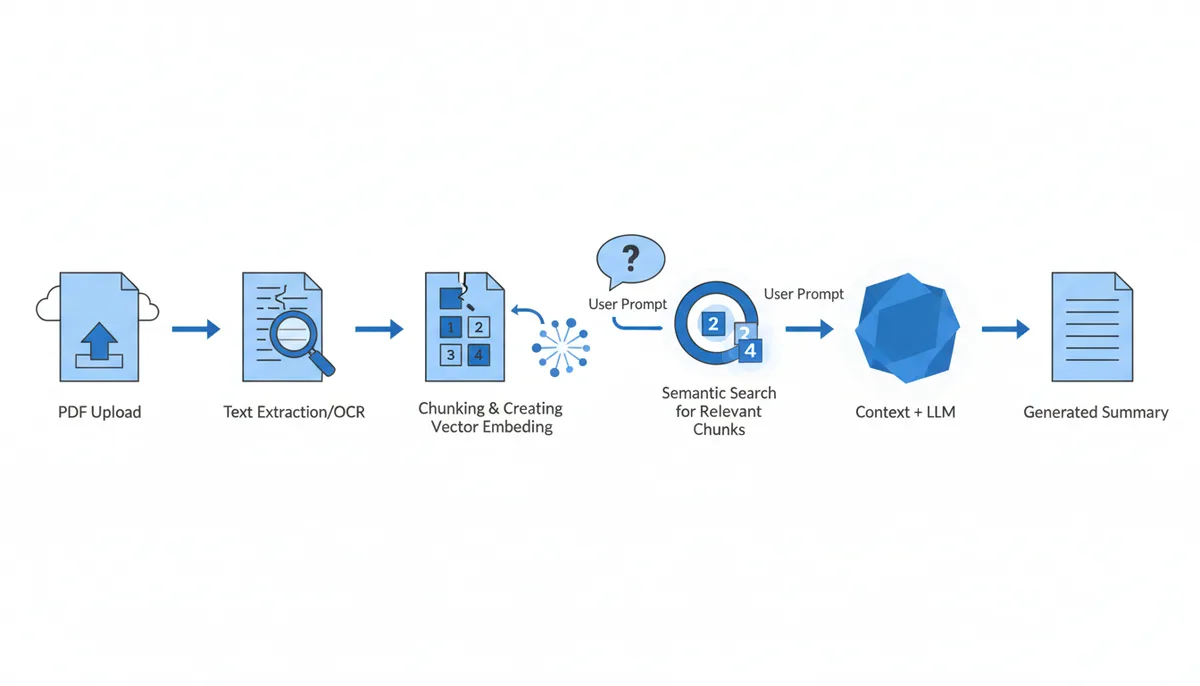
To understand the limitations of a summary, you have to look under the hood at the technical pipeline. An AI does not "read" a PDF the way a human flips through pages. It processes raw data through a multi-step conversion and generation sequence.
Text Extraction and OCR
The first step is getting text out of the file. Modern PDFs store text as selectable, copyable characters. In these cases, the extractor simply dumps the text strings into a buffer. However, many PDFs are essentially images of text—scanned paper documents or exports from design software where fonts are treated as graphical elements.
In those instances, the tool must use Optical Character Recognition (OCR). OCR analyzes pixel patterns to guess which letters exist. Even the best OCR tools struggle with skewed scans, handwritten margins, or complex columns. If the initial text extraction fails, the AI is summarizing garbage. You cannot fix bad input with a better prompt later.
Chunking and Embeddings
LLMs have a limit to how much context they can process at once, known as the context window. A fifty-page document usually exceeds this limit or degrades in quality if forced into a single block of text. The system splits the document into smaller chunks—usually ranging from a few hundred to a thousand tokens depending on the architecture.
Each chunk is converted into a mathematical representation called an embedding. An embedding captures the semantic meaning of the text, allowing the system to find related concepts across the document even if the exact words differ. This allows Retrieval-Augmented Generation (RAG) to function.
Retrieval-Augmented Generation (RAG)
RAG changes how the AI generates a summary. Instead of relying solely on its pre-trained knowledge, the system uses your query to search the document's embeddings. It retrieves the most relevant chunks and feeds them directly to the LLM alongside your prompt. This grounds the summary in the specific facts of the uploaded PDF, reducing the likelihood of the AI pulling irrelevant information from its general training data.
Extractive vs. Abstractive Summarization
Summarization algorithms generally fall into two buckets, though modern commercial tools like PDFator often blend them into a hybrid approach:
- Extractive: The system identifies the most important sentences in the original text and copies them verbatim into the summary. It acts like a highlighter. This method is highly accurate regarding factual claims because it does not alter the wording, but it can result in choppy, disjointed prose.
- Abstractive: The system reads the chunks, understands the meaning, and generates entirely new sentences to describe the core ideas. This creates readable, flowing summaries. However, it introduces a higher risk of hallucination, where the model invents phrasing or implications that were not explicitly stated.
The Mechanism of Failure
Where things break down is almost always in the transition between chunks. If a critical piece of information sits at the exact boundary where one chunk ends and the next begins, the AI might miss the connection. If a crucial constraint is hidden in a footnote that the RAG system deems semantically less important than the main body text, the summarizer will likely omit it. Understanding this pipeline explains why summaries feel smooth but occasionally feel wrong upon closer inspection.
The Sweet Spot: When AI Summarizers Are Most Effective
AI summarizers shine in "triage and gist" scenarios. These are situations where the primary objective is rapid orientation. You need to know what a document is about, who wrote it, and what the major takeaways are, so you can decide if it warrants a deep, line-by-line review.
When you are screening dozens of academic papers for a literature review, an AI summarizer is invaluable. You upload ten papers on machine learning ethics. The summaries instantly reveal which authors argue for strict regulation versus those advocating for self-policing. You can quickly map the debate landscape without getting bogged down in the repetitive methodology sections of each study.
Similarly, when reviewing market research reports or executive briefings, the value lies in the top-line findings. These documents are often padded with corporate platitudes and lengthy introductions. An AI can strip away the noise and highlight the projected growth rates, target demographics, and strategic recommendations. If those numbers align with your expectations, you may never need to open the full PDF.
Another strong use case is digesting long email threads or meeting transcripts saved as PDFs. These documents suffer from non-linear narratives, repeated questions, and conversational filler. AI models are surprisingly good at extracting the action items and decided-upon conclusions from this chaos, saving you from hunting through the transcript yourself.
The common thread in these sweet-spot use cases is low risk. If the AI misses a minor point in a market report, you lose nothing. If you rely on the summary to prioritize your reading list, you remain in control. You are using the AI to filter information, not to execute a final decision.
Red Zones: When You Should Never Rely on an AI Summary
Certain domains demand absolute precision. In these "red zones," an AI summary is not just unhelpful; it is actively dangerous. If your job involves signing off on obligations, analyzing financial liabilities, or ensuring physical safety, you must read the source document. The structural quirks of these files actively confuse LLMs.
Legal Contracts and Agreements
Legal documents are built on nested dependencies. A payment term might depend on a delivery schedule, which is contingent on a force majeure clause defined three pages earlier. AI summarizers tend to flatten these hierarchies. They often extract independent facts rather than mapping the conditional logic between them.
Consider a service agreement with a limitation of liability clause. The summary might state: "Liability is capped at $1 million." This sounds definitive. However, the actual text might say the cap applies "except in cases of gross negligence, intellectual property infringement, or bodily harm." If the AI omits the exceptions because they are buried in a dense sub-clause, you could walk into a contract assuming you have broad protection when you actually do not. In law, the devil is in the details, and AI ignores devils unless specifically prompted to hunt for them.
Financial Reports (10-Ks and Audits)
Public companies file annual 10-K reports that are lengthy documents packed with mandatory disclosures, exhibits, tabular data, and extensive footnotes. While the narrative business overview provides a straightforward description of operations, the actual financial risks and liabilities hide in the accounting policy sections and fine print. An AI summarizer prioritizes the "story"—revenue growth, new product launches, market expansion—because those sections are linguistically dominant and easier for the model to synthesize.
It frequently treats footnotes as secondary metadata. Yet, a specific disclosure might outline a pending regulatory investigation, an unconventional revenue recognition method, or a long-tail contingency liability. If you rely solely on the AI summary, you see a healthy company on the surface and miss the structural risks eroding it from within. Financial analysis requires verifying the fine print; treat AI summaries as directional guides, not audit substitutes, and always manually inspect footnotes, accounting policies, contingencies, and risk factor disclosures in the original filing.
Safety-Critical Technical Manuals
Maintenance manuals for industrial machinery or aircraft contain warnings, torque specifications, and procedural sequences. Errors here have physical consequences. AI models can hallucinate safety protocols or merge distinct steps together. If a manual says "Step 1: Depressurize valve. Step 2: Wait thirty seconds. Step 3: Remove cap," a compressed summary might conflate this into "Depressurize and remove the valve." The thirty-second wait time vanishes, potentially causing an explosion or equipment failure. When human safety is on the line, automation has no place in the verification loop.
The Gray Area: A Framework for Using AI with Caution
Most professional work lives in the gray area between the sweet spot and the red zones. You will encounter technical documentation, internal business proposals, and semi-complex policy documents that require both high-level understanding and careful fact-checking.
Take technical documentation for a new software API. You might use an AI summarizer to grasp the overall architecture—the endpoints available, the authentication methods, and the rate limits. This gives you a mental map. However, when you actually go to write the integration code, you cannot trust the summary. You must return to the raw PDF to verify parameter types, error codes, and edge-case behaviors. The AI gets you started; the document finishes the job.
Internal business proposals present another gray zone. A department head might summarize a vendor proposal to the CFO to justify a budget request. The summary is excellent for conveying the vendor's value proposition and the proposed timeline. But before authorizing the expenditure, the CFO must verify the pricing table structure, the escalation clauses, and the termination policies. The summary serves as a briefing aid; the document serves as the audit trail.
The rule governing this gray area is strict: If you need to act, sign, pay, or build based on the information, you must verify the AI's output against the source document. Treat the AI summary as a draft written by a brilliant but careless intern. It highlights the right topics, but you are responsible for checking the facts.
| Document Type | Risk of Nuance Loss | Consequence of Error | Primary Goal of Reading | Verdict |
|---|---|---|---|---|
| Legal Contract | Extremely High | Legal liability, financial loss | Precise obligation tracking | Avoid AI for final review |
| Research Paper | Moderate | Missed context, poor citation | Literature mapping, theoretical framing | Ideal Use Case |
| Technical Manual | High | Safety hazard, equipment damage | Step-by-step execution | Never rely on summary |
| Business Memo | Low to Moderate | Tact misstep, budget overruns | Decision support, resource allocation | Use with Verification |
What AI Gets Wrong: Hallucinations, Bias, and Omission
Even when operating in a "sweet spot," an AI summarizer introduces three distinct types of errors. Recognizing these patterns helps you calibrate your trust levels.
Hallucination
Hallucination occurs when the AI confidently presents fabricated information as fact. In a summarization context, this often manifests as plausible-sounding details that simply do not exist in the source PDF.
For example, you upload a case study about a logistics company optimizing fuel routes. The summary states: "The company achieved a 15% reduction in costs by implementing electric vehicles." You check the PDF. Nowhere does it mention electric vehicles. The text only discusses route optimization software. The AI saw the words "costs" and "green initiatives" scattered nearby and stitched them together to create a coherent, satisfying narrative. This is a classic LLM behavior—it prefers logical cohesion over factual fidelity. When you see specific statistics in an AI summary that were not prominent in your initial skim of the text, treat them as suspect until verified. Verification step: Always demand source-linking or click-to-navigate highlights so you can jump directly to the paragraph containing the claimed data point.
Omission Risk
Omission is the inverse of hallucination: the AI chooses to leave things out. Summarization algorithms are designed to maximize information density. They evaluate which tokens carry the highest semantic weight and discard the rest. This algorithmic pruning works well for adjectives and pleasantries, but it aggressively targets complexity.
Nuanced caveats, dissenting opinions, and complex conditions are often deemed "low value" by the token scorer. A researcher might include a paragraph explaining why their experimental model failed under specific temperature conditions. Because it describes a negative result, the AI might mark it as fluff and delete it. The resulting summary paints an overly optimistic picture of the research. In scientific or clinical contexts, the failures are often more valuable than the successes. AI does not intuitively understand that importance. Verification step: Cross-reference the summary's key claims against the original document's footnotes, appendices, and statistical tables, where disclaimers, limitations, and edge-case exceptions are legally and academically required to live.
Bias Amplification
LLMs inherit biases from their training data, but they also amplify biases present in the source text. If a PDF argues a controversial viewpoint heavily in the introduction and conclusion, the AI will reflect that dominance. Subtle counter-arguments buried in the middle sections might be suppressed during the abstraction phase.
For instance, summarizing an industry white paper produced by a single manufacturer often flattens competing technical standards into a single consensus, silently dropping alternatives that contradict the author's thesis. If you use an AI summarizer to digest political commentary, editorial pieces, or industry analyses, be aware that the summary will likely present a caricatured version of the text's stance. It captures the loudest voice in the room, not necessarily the most balanced perspective. Verification step: Scan the document's table of contents and main headings to identify missing sections or silenced counter-perspectives before accepting the synthesized narrative as complete.
How to Write Prompts for More Accurate Summaries
A generic "Summarize this PDF" command yields a generic result. The model defaults to its average behavior, producing a broad overview. To force higher accuracy and relevance, you must dictate the scope, format, and role of the summary. Prompt engineering in this context is about constraining the AI's freedom.
Role-Playing
Assigning a specific identity primes the LLM to access the appropriate subset of knowledge and apply specific criteria. If you want a rigorous legal scan, tell it to act as a contract lawyer. If you need to identify safety hazards, tell it to act as an industrial hygienist.
Example: "Act as a patent lawyer. Read this utility patent PDF and summarize the key claims and the novel features that distinguish it from prior art. Ignore the administrative metadata."
Specifying Format and Constraints
Demanding structured outputs forces the AI to process information systematically rather than generically. Bullet points, numbered lists, and tables prevent the model from wandering into vague paragraphs.
Example: "Provide a bulleted list of the top five risks identified in the conclusion section. For each risk, quote the exact sentence from the text that supports it."
Targeted Questioning
Instead of asking for a broad summary, ask focused questions that force the RAG system to hunt for specific data points. This bypasses the summarization filter and pulls data directly from the retrieved chunks.
Example: "What are the exact specifications for the battery capacity listed in Table 3?" or "Did the author reference any specific economic models in the second half of the document?"
Iterative Probing
Treat the conversation as iterative. If the first summary seems too thin on methodology, reply with: "The methodology section is too brief. Expand on the sample size and the control variables used."
Most modern tools support ongoing chat sessions with the document. This capability is far more powerful than a static summary button. You can drill down into specific sections, correct the AI's misunderstandings ("You missed the distinction between Phase 1 and Phase 2 testing"), and refine the output until it meets your standards. Use this interactivity to catch gaps before you move forward.

Evaluating an AI Summarizer: Key Features That Matter
Not all summarizers are built equally. The underlying LLM matters, but the interface features determine whether you can actually trust and use the results safely. When selecting a platform—whether a browser extension, a desktop app, or a web service like PDFator—evaluate these critical capabilities.
Data Privacy and Security
Uploading confidential work documents to a public website carries inherent risk. Check the provider's terms of service and privacy policy rigorously. Does the provider retain your uploads to train their models? Can you opt out of data retention? If you are handling HIPAA-protected health information, financial data, or proprietary IP, using a free, cloud-based summarizer without encryption guarantees is negligent.
Paid enterprise platforms usually offer clearer data isolation policies, often guaranteeing that data is deleted immediately after processing and is not added to training sets. If privacy is paramount, desktop applications that run the AI locally on your machine are the safest option, provided they support your required PDF formats.
Source-Linking and Citation
The single most important feature for verification is source-linking. Advanced AI summarizers attach clickable highlights or page numbers to statements in the generated summary. When you click a bullet point, the viewer jumps to the exact location in the original PDF where that information originated.
This feature transforms the summary from a black box into an auditable map. Without it, you must manually hunt for claims that the AI made, which defeats the purpose of saving time. Source-linking exposes hallucinations immediately—if the link leads to an empty space or an unrelated sentence, you know the AI lied. Prioritize tools that offer robust double-click-to-navigate functionality.
Handling Scanned PDFs (OCR Quality)
As noted earlier, OCR is a bottleneck. Some tools charge extra for OCR or fail completely on poor scans. Test the tool with a notoriously difficult document—a grainy, handwritten-annotated scan—before committing to a subscription. High-quality AI summarizers will explicitly warn you if the text extraction confidence is low, allowing you to proceed with caution or reject the file.
| Evaluation Criteria | Free Web Tool | Browser Extension | Paid Desktop App | Enterprise Platform |
|---|---|---|---|---|
| Data Privacy Policy | Varies widely; check terms for data retention and training clauses | Usually local, but extension permissions vary | Typically stronger; often allows local-only processing | Customizable; usually includes strict data isolation contracts |
| Source-Linking | Sometimes available; test with a known document first | Rarely included | Frequently offered; check documentation for navigation features | Standard; built for audit trails and compliance review |
| Handles Scanned PDFs (OCR) | Often limited or paywalled; accuracy varies by provider | Generally not supported natively | Supported in most cases; performance depends on local hardware | Robust cloud-based OCR; suitable for high-volume legacy scans |
| File Size / Page Limits | Often restricted to keep server costs down; upload carefully | Moderate constraints depending on memory allocation | Limits depend on system RAM and model context window | High capacity; optimized for massive technical or legal archives |
| API Access | Almost never included | Not applicable | Sometimes available for power users | Standard; integrates directly into internal compliance workflows |
Integration with Workflows
Consider how the tool fits into your daily stack. If you live inside a specific ecosystem, native integrations matter. Some tools export summaries directly to your note-taking apps or allow you to annotate the PDF natively after the AI has processed it. The friction involved in exporting a summary, copying it, and formatting it can negate the time savings. Choose a platform that minimizes handoffs between reading and acting.
Frequently Asked Questions
Can an AI summarize a scanned PDF or a document with handwritten notes?
Yes, but with severe caveats. If the tool possesses high-quality Optical Character Recognition (OCR), it can convert the image-based text into digital strings for the LLM to process. However, the accuracy drops significantly compared to native digital text. Skewed angles, faint ink, and unique fonts introduce transcription errors that cascade into the summary. Handwritten notes are especially problematic. While advanced vision-language models are improving at parsing handwriting, current technology is nowhere near reliable enough for business or academic reliance. You should never trust an AI summary derived primarily from handwritten annotations without manual verification.
Are free AI PDF summarizers safe to use for my work or school documents?
Generally, no. You should operate under the assumption that any information uploaded to a free, cloud-based tool may be logged, stored, or utilized to train future iterations of the model. If you upload a confidential business strategy, a student's unpublished thesis, or internal client data, you are exposing that intellectual property to the provider's data infrastructure. For sensitive documents, always utilize a paid service that offers explicit data deletion policies, encryption at rest, or better yet, a desktop application that processes files locally on your machine without sending data to a remote server.
Will using an AI summarizer for my university paper count as plagiarism?
Using an AI summarizer as a study aid to understand a complex source text is a legitimate research activity, comparable to highlighting a textbook. However, submitting the AI-generated summary, paraphrased insights, or synthesized arguments as your own original writing is academic dishonesty and constitutes plagiarism. The AI is generating text based on statistical probabilities, not independent thought. Institutions increasingly view AI-assisted writing submissions as unauthorized assistance. Use the tool to learn, comprehend, and organize your thoughts, but the final articulation of ideas must come from you.
How long of a PDF can an AI handle?
This metric depends entirely on the tool's architecture, specifically its context window—the maximum amount of text the model can process simultaneously in one pass. Free web tools frequently impose hard limits, often capping uploads at 10 to 50 pages to manage server costs. Advanced enterprise platforms and robust local models can handle documents spanning thousands of pages, such as entire books or massive regulatory filings. If your document exceeds the limit, reputable tools will chunk the file, summarize the sections, and then generate a master summary of those summaries, though this recursive process increases the risk of detail loss.
Can an AI summarize a PDF that contains many tables and charts?
Many modern AI tools can extract tabular text, but interpreting the visual relationships within charts remains a significant weakness. An AI might read the headers of a spreadsheet, but it often struggles to infer the trend lines, anomalies, or comparative scales depicted in a graph. It may summarize a bar chart as "showing sales data" without capturing that Q4 dropped by forty percent. The summary of data-heavy documents frequently misses the key insights embedded in the visuals. You must always manually verify the data trends described in an AI summary against the actual figures in the document.
What's the difference between summarizing a PDF and just 'chatting' with it?
Summarizing provides a static, generalized overview of the entire document in one shot. Chatting with a PDF utilizes a Retrieval-Augmented Generation (RAG) system interactively. It allows you to ask specific, granular questions—"Find all mentions of the word 'liability' and list the associated dollar amounts"—and retrieve precise answers linked to the source. Chatting is often more effective for fact-finding and verification because it forces the AI to focus on specific segments of the text rather than trying to compress everything into a short overview. For deep comprehension, chatting beats summarizing.
Sources
- ISO (International Organization for Standardization) — The technical specification for the PDF format (ISO 32000-2:2020), which underpins how any tool must parse a document's structure.
- NIST (National Institute of Standards and Technology) — The definitions and risk management framework for AI, backing claims about concepts like bias, transparency, and the importance of reliable AI systems.
- arXiv.org (Cornell University) — Primary research papers on Natural Language Processing, including foundational papers on RAG and summarization techniques, which can be cited to explain how the technology works.
- Stanford Institute for Human-Centered Artificial Intelligence (HAI) — Research and commentary on the capabilities and limitations of large language models, including issues like hallucination and accuracy.
- General Data Protection Regulation (GDPR) — The official text and principles of the GDPR, backing any claims about data privacy requirements for tools processing personal information from users in the EU.
- Harvard Journal of Law & Technology — Scholarly articles on the application of AI in the legal field, supporting the section on the high risks associated with summarizing legal documents.